Home and Learn: Intermediate Programming
Stick Figure Woman - Arms and Legs

Stick Figure App - Head, Arms, Legs
We drew the head and body for our stick figure woman in the last lesson. In this lesson, we'll write code to draw the arms and legs.
The arms are going to be straight. But they need to touch the triangle at the midway point. So the X and Y coordinates are little tricky.
The X and Y positions are easy enough for the start of the left arm - it's the mouseX and then the mid body for the Y. The end of the line for the left arm is less straightforward. We're trying to get this point, the red circle in the image below:
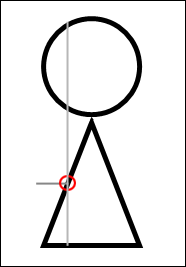
The X position for the end of the line is the mouseX plus the head radius divided by 2 (or the diameter divided by 4). The Y position is still the mid body.
With all that in mind, the code for the left arm in VB Net is this:
graphicsObject.DrawLine(drawingPen, mouseX, size.MidBody, CInt(mouseX + (size.HeadRadius / 2)), size.MidBody)
And here's the code in C#:
graphicsObject.DrawLine(drawingPen, mouseX, size.MidBody, mouseX + (size.HeadRadius / 2), size.MidBody);
Notice that it's the VB Net code that needs an integer cast this time. You can convert to an integer with CInt. Whatever you're trying to convert goes between the round brackets of CInt.
Draw the Right Arm
For the right arm, we're trying to do this:

The start of the line for the X position is mouseX plus ¾ of the diameter of the head. The Y position is still mid body.
The end of the line for the right arm is still mid body for the Y position. For the X position it's the mouseX plus the head diameter.
So, that means the code for the right arms is this in VB Net (note the CInt):
graphicsObject.DrawLine(drawingPen, CInt(mouseX + (size.HeadDiameter * 0.75)),size.MidBody, mouseX + size.HeadDiameter, size.MidBody)
And this in C#:
graphicsObject.DrawLine(drawingPen, mouseX + (int)(size.HeadDiameter * 0.75), size.MidBody, mouseX + size.HeadDiameter, size.MidBody);
Once you've added the code, your Sub should look like this in VB Net:

And here's the C# version:
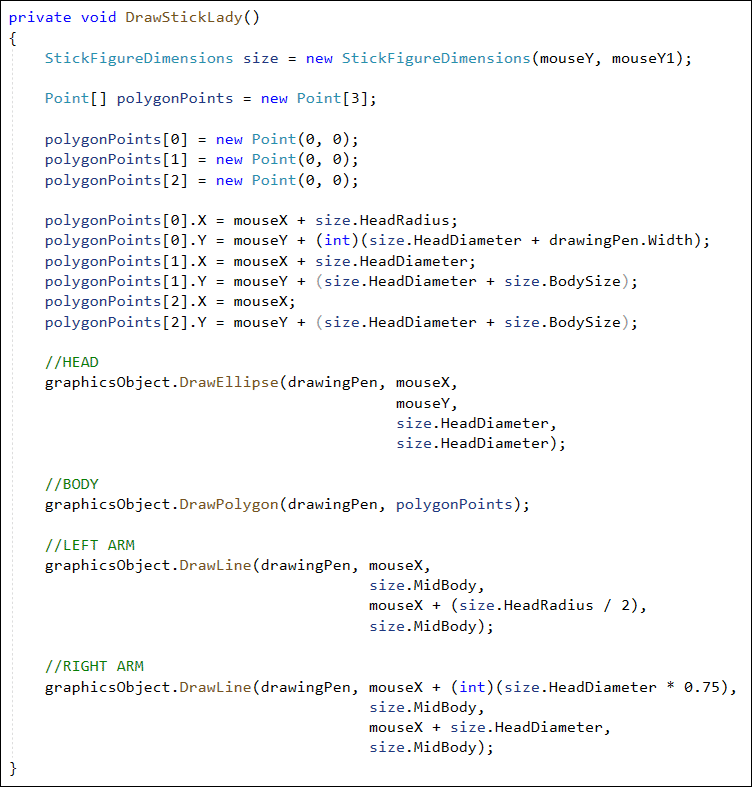
You can try it out now. When you draw a stick figure female, it will look like this:
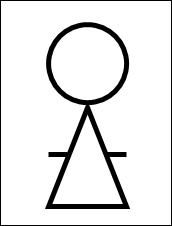
We only have to draw the legs now and we're done with the stick lady.
Drawing the Legs
The start of the legs is the bottom of the triangle. For us, this is the mouseY, plus the head diameter, plus the body size. That will give us the starting Y position for both legs.
The end position for the legs just adds the leg size to the start of the legs.
The X positions are the same as the end X for the left arms and the start X for the right arm.
Here's the code for the left leg in VB Net (the line's a bit long):
graphicsObject.DrawLine(drawingPen, CInt(mouseX + (size.HeadRadius / 2)),
mouseY + size.HeadDiameter + size.BodySize,
CInt(mouseX + (size.HeadRadius / 2)),
mouseY + size.HeadDiameter + size.BodySize + size.LegSize)
And here's the code for the left leg in C#:
graphicsObject.DrawLine(drawingPen, mouseX + (size.HeadRadius / 2),
mouseY + size.HeadDiameter + size.BodySize,
mouseX + (size.HeadRadius / 2),
mouseY + size.HeadDiameter + size.BodySize + size.LegSize);
The code for the right leg in VB Net is this:
graphicsObject.DrawLine(drawingPen, CInt(mouseX + (size.HeadDiameter * 0.75)),
mouseY + size.HeadDiameter + size.BodySize,
CInt(mouseX + (size.HeadDiameter * 0.75)),
mouseY + size.HeadDiameter + size.BodySize + size.LegSize)
And here's the code for the right leg in C#:
graphicsObject.DrawLine(drawingPen, mouseX + (int)(size.HeadDiameter * 0.75),
mouseY + size.HeadDiameter + size.BodySize,
mouseX + (int)(size.HeadDiameter * 0.75),
mouseY + size.HeadDiameter + size.BodySize + size.LegSize);
When you've added the code, your Sub should look like this in VB Net:

And the method for the legs should look like this in C#:

Run your program and give it a try. Click your stick figure female button. Draw one out on the white canvas. After all that hard work, it will look like this:

OK, that was quite difficult! But only when trying to work out where all the points go for a polygon, and the start and end points for lines. If you can crack that you can draw any kind of shape!
Now that you can draw stick figures, we'll move on and give users an option to add text. A new form will appear when we right-click the drawing surface. We'll design the form first.
