Home and Learn: Intermediate Programming
TrackBars, Line Styles

Stick Figure App - Form Design
We can finish off our form design by adding a TrackBar (a slider) and adding some radio buttons to our Line Style Group Box.
Line Style Group Box
In the Line Style Group Box, add two Radio Button controls. Change the Name property of the first one to RadioSolid and the Text property to Solid. Change the Name property of the second one to RadioDashed and the Text to Dashed.
To set a default button to be the selected item in a Group Box, click on the RadioSolid radio button. Locate the Checked property and set it to True.
Add a TrackBar Control to a Windows Form
To add a TrackBar to your form, type its name into the Search box at the top of the toolbox:
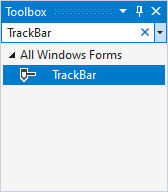
Draw one out on your Brush Size Group Box. Stretch its width to a decent size. Change its Name property to TrackBrushSize. Now locate and change the following properties:
Maximum: 20
Minimum: 1
Value: 5
Add some labels under the tracker. Add one on the left and change the label text to 1. Add one in the middle and change the label text to 10, and at one at the end for 20. Your Brush Size Group Box should look like this:
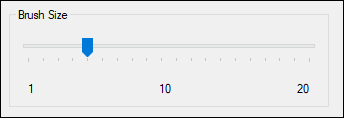
And that completes the design of the form. It should look like this, when you're done:

Next up, you'll take a look something called Version Control.
