Home and Learn: Intermediate Programming
Create your own Stick Figure Cartoon Program - Introduction

Stick Figure App - Form Design
In this project, you'll code your own Stick Figure drawing program. You'll be able to create stick figure cartoons with an option to add text to your drawings. We'll give you the code for both Visual Basic .NET and C# .NET. It will look like this when we're done:

The technique we'll use to draw on our white surface is this: Click the button for the stick figure you want, hold your left mouse button down on the white surface, keep it held down, drag to the right, release the left mouse button. When the mouse is released, you'll get a stick figure:

You can also set a color for your figure, and a brush size:

We'll have options to Undo and Redo the drawing.
When you right-click on the white surface, a font dialog box will pop up where you can add some text:
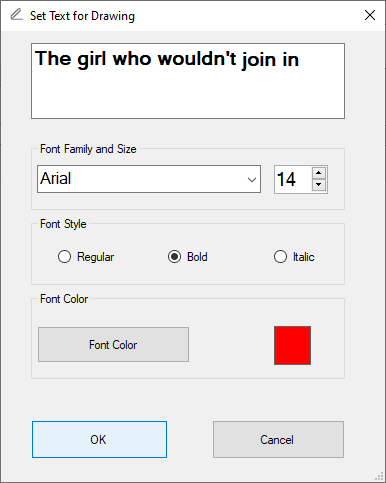
Click OK and it will add some text to your drawing:
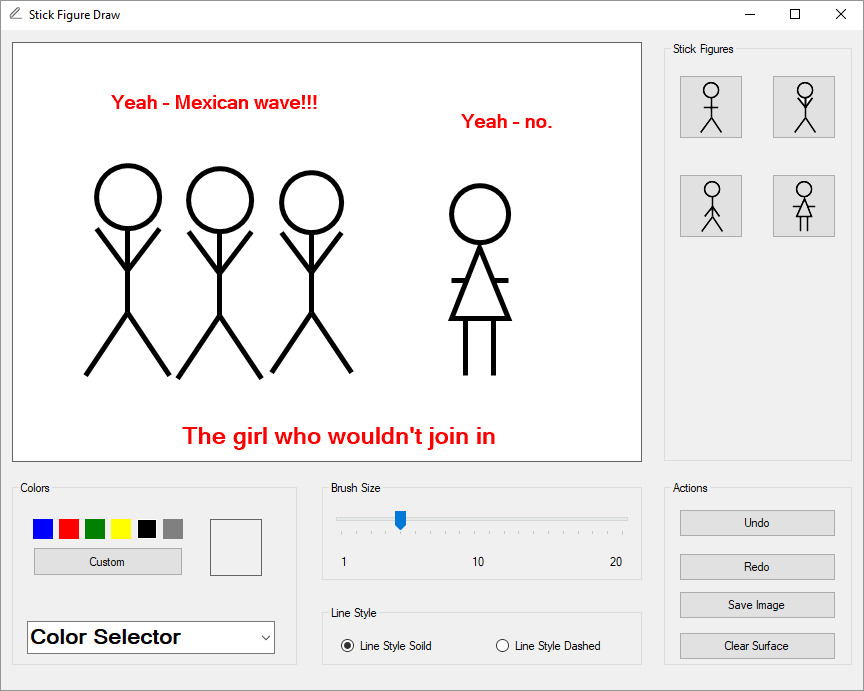
Among the topics you'll learn about in this section are:
Version Control
Bitmap and Graphic objects
Working with Boolean flags
Dealing with colors
How to get the system colors
Images on buttons
How to draw irregular shapes
Undo and Redo a Drawing
How to get the system fonts
Create a Font Dialog Box to get text
This is an intermediate project that will teach you how to produce a fuller program.
It's quite a long project that will border on the advanced at times. But it includes the kind of things you should be doing, if you want to improve as a programmer. So let's make a start. We'll design the form, first.
