Vibe Coding the Match Three Game
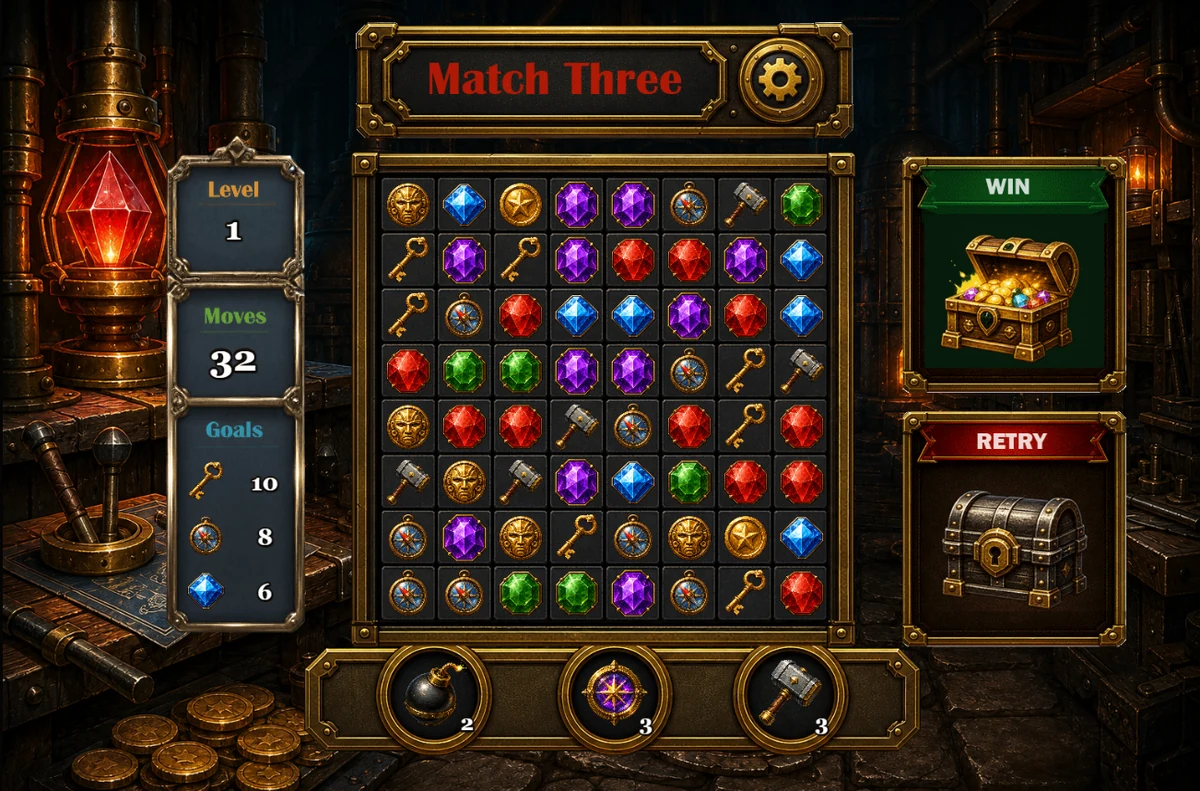
After the planning and asset work in the Match-Three game setup lesson, it's time to start coding. This tutorial concentrates on the initial implementation, core game mechanics, sound, the win screen and testing with Codex and Phaser:
By the end of this lesson, you will know how to:
- Create a Phaser project from an existing set of game assets.
- Build a match-three game in manageable stages.
- Preview and test a browser game locally.
- Review and refine code created by Codex.
- Add boosters, sounds, settings and win/loss behaviour.
We're going to be creating our Match Three game in a browser. If you didn't manage to create your game assets in our previous lesson, you can download our asset pack here:
DOWNLOAD GAME ASSET PACK (24 MB)
The asset pack is a ZIP file, so you'll need to unzip it before continuing. Keep all the supplied folders and filenames unchanged, because the prompts in this lesson refer to them directly. Make a note of where on your computer you saved the file to.
Initial Game Implementation
We'll use HTML/CSS and JavaScript to create the game. In particular, there is a great Javascript gaming library called Phaser. If you didn't know any of this, however, and had no idea about browser games and how they are constructed, you could ask Codex for advice. Here is a prompt you could try:
You'll get quite a lot of information back, including some details on Phaser 4, hopefully. We'll attach our User Interface image to give Codex an idea of what it is trying to build. But we'll build our game in stages. It is usually a bad idea to ask Codex just to build the whole game at once. Much better is to create the game using smaller steps. To start with, we'll ask Codex just to build our user interface using Phaser 4.
(Phaser provides the game loop, input handling, asset loading, animation and rendering needed by a browser game. HTML supplies the page containing the game, CSS can style the surrounding page, and JavaScript contains the game logic.)
So, attach the image of your User Interface to Codex. Here is a prompt you can use. Notice we are listing where our files are, the image names and purposes:
Codex will go off and build your UI. It may report back with something like this:
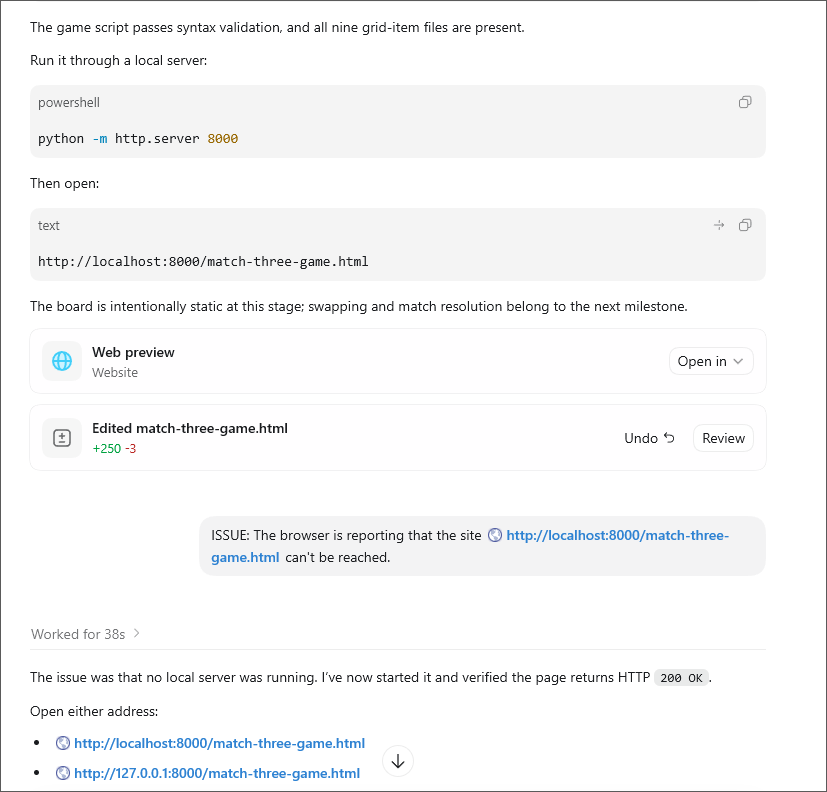
Note that Codex has given us a Web Preview link. Click the dropdown where it says Open in:
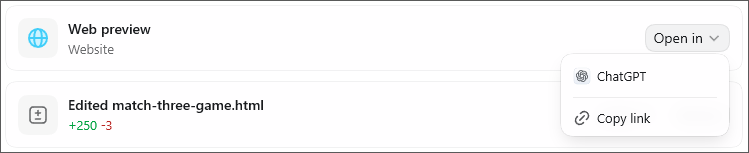
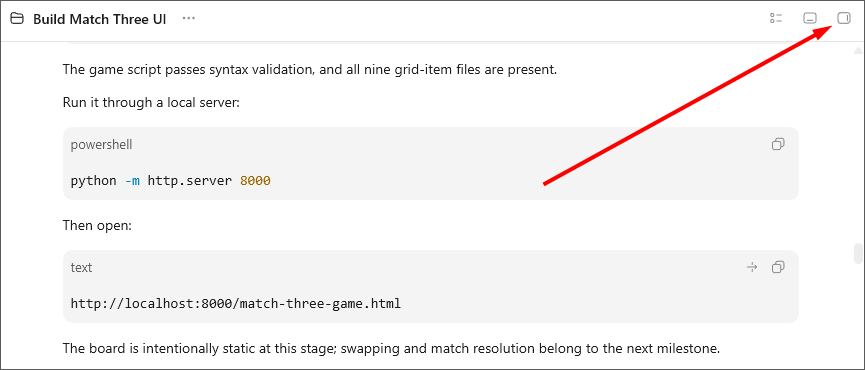
If you select the Codex link, it will try to launch a web page using its in-app browser. You can toggle this on and off at the right of the Codex screen:
If you want to open the game in an external browser, select the Copy Link option above. Then fire up your browser. Copy the link into the browser address bar to launch the game.
However, you may get errors saying that the site can't be reached, as in our previous image. (Not super helpful, if you have no experience in starting a local server.) If you do get an error, it could be because you didn't start the server. In which case, ask Codex to start it for you as we did in the images above.
Eventually, Codex will assemble your user interface on top of your background image and display the results in a browser window. You'll have a game that looks similar to this:
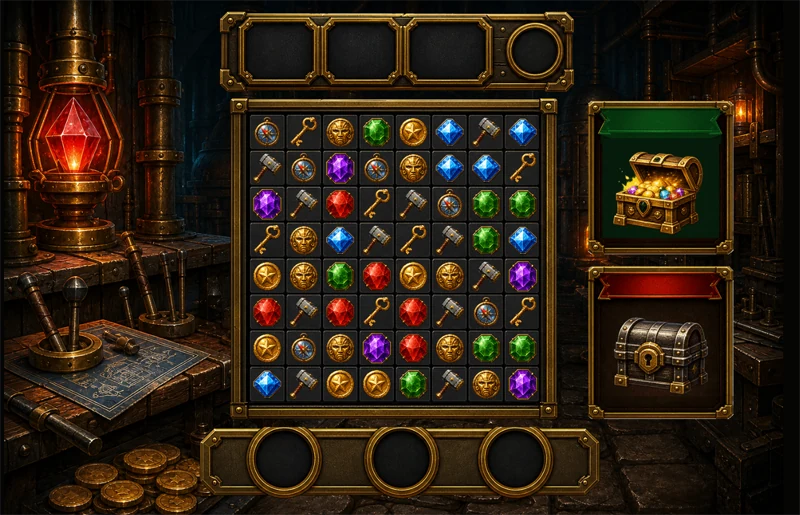
At this stage, if you don't like something, or elements are not aligned properly, you can tell Codex what's wrong. It will then make corrections. If you like what you see, you can go ahead with the next step.
Core Match-Three Game Mechanics
You can ask Codex for a recommended build order for your Match Three game. Something like this prompt should work:
Codex will then come back with a list of things it thinks you should implement. Something like this:
- Populate the 8×8 board without starting matches.
- Add adjacent swapping and invalid-swap reversal.
- Detect matches, clear pieces, collapse columns, and refill.
- Add goals, score, and move limits.
- Add cascades, special pieces, and boosters.
- Add sound and visual effects.
- Add saved progression and level data.
Again, don't ask Codex to implement the list all at once. Take it a few at a time. Like this:
Then, once that works to your satisfaction, ask Codex to work on the next items:
Testing and Refining the Game
The reason to do it this way is that, if Codex gets something wrong, or you'd like to make some changes, you can ask it to work on your changes without a full rewrite of the game. If Codex needs to do a full rewrite, it may use more tokens than you need to.
You may have heard sensational headlines in the media detailing the various ways AI models have overwritten files, or just merrily deleted anything that takes its fancy. If you're worried about this, you can add a safe prompt:
And, after every major implementation prompt, you could reuse a prompt like this:
But keep working down your list until you get a Match Three game that is a decent basic version, in terms of Match Three game mechanics. If you need help or clarification, just ask. For example, if you're not sure how the boosters work, you can ask Codex:
For us, Codex came back with an excellent in-depth reply:
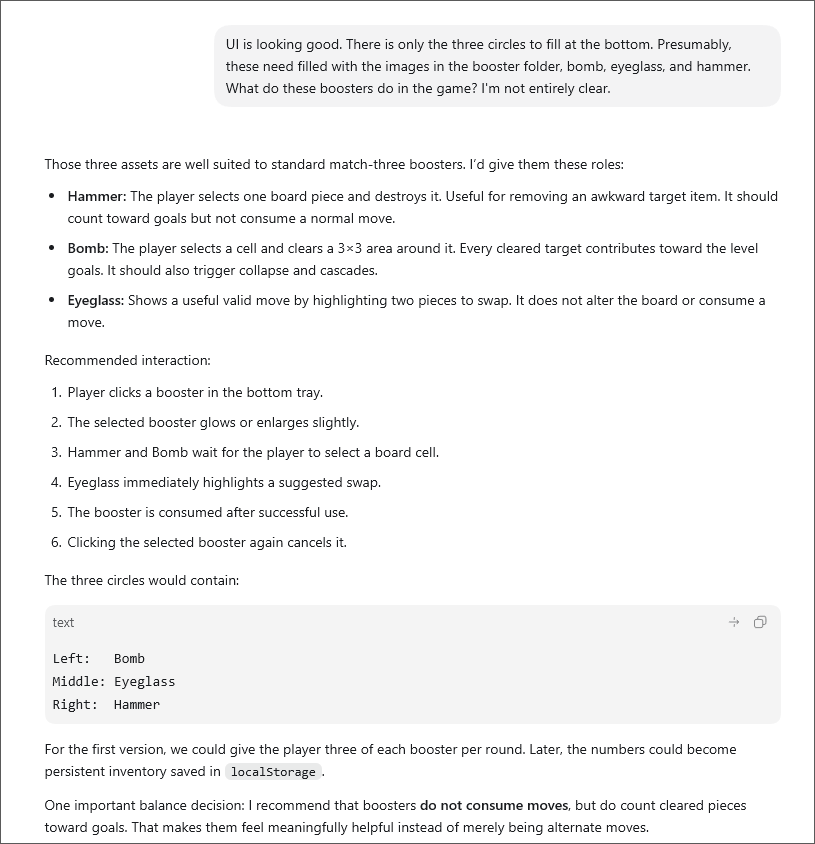
We were then able to ask a follow-up question:
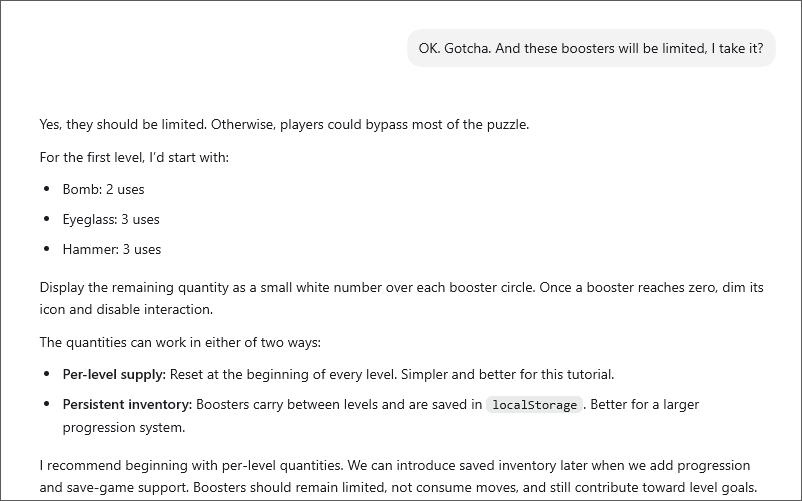
That allowed us to add this prompt:
Codex went to work and implemented the booster system for us.
However, for us, there was an issue, which we raised with this prompt:
Codex understood what we were saying - that the game may give us a situation when there are no moves for the player to make. It replied starting with this:
We then asked Codex to implement this 'automatic deadlock detection and reshuffling'. The point here is that, if you get stuck, just ask Codex.
Win and Retry Panels
For our Win panel, we wanted the treasure chest to open gradually, before springing fully open when the player wins.
For that, because our treasure chest was fully open at the start, we needed a few more images. So we asked Codex to create them for us:
Codex came back with this:
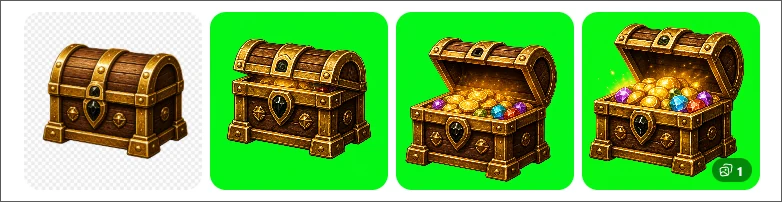
When then asked it to implement our chest opening animation:
Feel free to ask Codex to implement something else for your WIN panel. You don't have to go with ours.
For the Retry panel, we just wanted the treasure chest to shake when the player came close to losing. Here's our prompt:
Game Sounds
Of course, you'll need sounds for your game. Unfortunately, Codex can't create sounds for you. So you'll have to look elsewhere. But you can ask
Codex came back with a detailed reply:
Kenney Interface Sounds - 100 UI sounds under CC0. Commercial use is allowed and attribution isn't required. Excellent for clicks, swaps, booster selection, and panel interactions. Kenney confirms its asset-page downloads are CC0.
Triple Treat: Match-3 Sound Effects - a free/pay-what-you-want pack specifically designed for match-three games. This is probably the most immediately relevant option.
400 Sounds Pack - includes match-three chimes, UI sounds, musical effects, impacts, and other useful categories. It is free for commercial use without required attribution, although redistribution of the unaltered pack is prohibited.
itch.io Match-3 SFX - a useful filtered collection. Check the licence on each individual pack because itch.io creators set their own terms.
Freesound - enormous selection for mechanical noises, glass impacts, gem chimes, explosions, workshop ambience, and similar effects. Filter for CC0 when possible. CC-BY requires attribution, while CC-BY-NC cannot be used commercially. Freesound's licence guide explains the differences.
OpenGameArt - good for music loops and game SFX, but licences vary per item. Prefer CC0 or straightforward CC-BY material; its licensing FAQ warns that some licences can conflict with closed-source distribution.
Pixabay Music and Sound Effects - useful for background music and ambience. Keep the download page and licence record for anything you use, because music can occasionally cause automated Content ID claims. Pixabay's FAQ recommends retaining those records.
It even gave us what it thought might make for a good sound for a particular effect:
Another option is to sign up to a music-making web service like Suno.com. Services like this not only allow you to create full songs at the click of a button, but most will have one-shot options so that you can type a prompt and have an AI generate a sound for you. Or the looped background music.
In the download folder for this game, we have included some sounds and background music for you. All of these were generated using Suno.com. (Not an ad for this site, by the way. We don't get paid by them.)
Once you have your sounds, you can fashion a prompt like this one:
Codex will then go off and wire up your chosen sounds. You can ask it to wire up the background music, too:
You can then ask it to swap out background-1.mp3 for the other background files in the folder to see which one you like best.
Just bear in mind that modern browsers often block audio until the player has clicked or tapped the page. If background music does not start automatically, begin playback after the player's first interaction.
Settings Screen
Of course, you'll want to give your players an option to switch off your sounds. This is best done with a popup screen, with some settings the user can change. Here's our prompt:
You may want to play some WIN music when the player wins. Again, you can ask Codex:
Here's what Codex came back with:
Even after all that, you may still have things that need fixing. Such as:
But we'll leave it there for this Match Three vibe coding tutorial. There's still lots to do for a polished game. For example, here are some of the things that Codex suggested we could do:
We haven't implemented any of the items on the list, because this tutorial would last forever if we did! Try adding some of the suggestions for yourself as you should now have a very good idea of how to vibe code with Codex.
In this lesson, you used Codex to build the game incrementally rather than attempting everything in one prompt. More importantly, you tested each stage, reported specific problems and refined the implementation without discarding working code. That inspect-implement-test-refine cycle is the central habit of successful vibe coding.
In the next lesson, you'll Vibe Code a data driven single-page app using Codex.
Next: Build a Premier League Transfer Data App with Codex -->