Home and Learn: AI Beginners Course
Uncensored AI Image Generation with Invoke and ComfyUI
Created:
If you've ever been censored by an AI image generator, or even suspected that your favourite cuddly AI is trying to shut you up, then this article is for you. Below, we'll go through some of the reasons why AI image generator censorship is a good idea. Then we'll list some of the counterarguments to the censorship. After that, you'll learn about two pieces of software that a responsible adult can install and use in order to generate uncensored images. Off we go!
AI Image generation - The Big Players, The Censorship
Image generation with AI is very easy. Anyone can do it. Just type some text, called a prompt, into a textbox, hit a button, and voila, an image appears. Some of the biggest technology companies now offer free, or at least free-tier, tools that can turn a few lines of text into an illustration, photograph or design. Here are some of the big boys:
The underlying models and usage limits change regularly, but the basic proposition is remarkably generous: create an account, type what you want to see, and receive an image moments later.
There is, however, a price attached to that convenience, even when no money changes hands. These services are tightly moderated. Prompts involving nudity, graphic violence, exploitation, hateful material, dangerous activity or real people may be refused, and automated filters sometimes reject perfectly innocent requests as well. Calling this 'censorship' may sound dramatic, but from the companies' perspective it is an unavoidable part of operating a mass-market service. Microsoft, Google and the other giants are not simply releasing image models; they are hosting public platforms that can be used at enormous scale and may be held responsible when those platforms are abused. Microsoft's rules and Google's prohibited-use policy consequently cover far more than explicit sexual material.
There is also a perfectly reasonable 'think of the children' argument. A free generator can be opened by millions of ordinary users. And only the most liberal of parents would welcome a tool that allowed a child to produce unlimited pornography, realistic scenes of torture or humiliating fake pictures of classmates. However, although the likes of Google restrict Gemini image generation to users aged 18 or over, if you think your kids can't bypass age-restrictions, we have a white house to sell you, complete with ballroom (currently unfinished).
Protecting children is not the only concern, though. Some adults would rather like to be protected, as well. Adults can generate abusive, degrading or deeply disturbing material that other adults never consented to see, while convincing deepfakes can harm the person being depicted, not to mention the audience encountering them.
The counterargument is that protecting people from genuine harm can easily slide into protecting competent adults from their own choices. A company may begin by blocking illegal exploitation and non-consensual imagery, then gradually extend its filters to fictional violence, artistic nudity, political satire, historical scenes or entirely harmless words that happen to trigger an overcautious system. From a freedom, or anti-nanny-state perspective, an adult should not need permission from Microsoft or Google to create a lawful image on their own computer. Age gates, separate adult accounts and controls over what may be publicly shared could arguably address many risks without dictating what every adult is allowed to make privately.
The tension between safety and creative control is where tools such as Invoke and ComfyUI enter the picture. There is a steeper learning curve to using these tools. But in return, they can provide substantially more choice over the model, workflow, filtering and final result. (In other words, if you want nudes, you can have them.) The question is no longer simply, 'Which AI makes the best pictures?'. It is also, 'Who gets to decide what pictures you are permitted to make?'.
With that out of the way, let's get down to the software. We'll briefly discuss ComfyUI, because it is quite popular. But, as you have to fiddle around with nodes to get anything to work, it is a lot harder to use than our other choice, Invoke.
Invoke versus ComfyUI
Invoke and ComfyUI are not AI image models themselves. They are applications that allow you to install, organise and use models such as Stable Diffusion, FLUX and various specialist editing models. Unlike the simplified generators offered by Microsoft, Google and OpenAI, both applications give you much more control over how an image is produced. When the models are run locally, your prompts and images can remain on your own computer, and there is normally no corporate service examining each prompt before it is processed. This does not remove your legal or ethical responsibilities, but it does mean that a distant platform is not automatically deciding whether your lawful creative idea is acceptable.
Both applications are free and open source, although the models still require substantial storage space and suitable hardware. A reasonably powerful graphics card can make generation much faster, while people without one may need to rent a cloud GPU. Some model licences also impose their own restrictions, so "open source" should not be confused with "anything goes."
The download link for Invoke is here:
(Windows, MacOS, Linux)
The link to install ComfyUI is here:
The ComfyUI GitHub repository is here (you can see a screenshot of the software):
What Invoke allows you to do
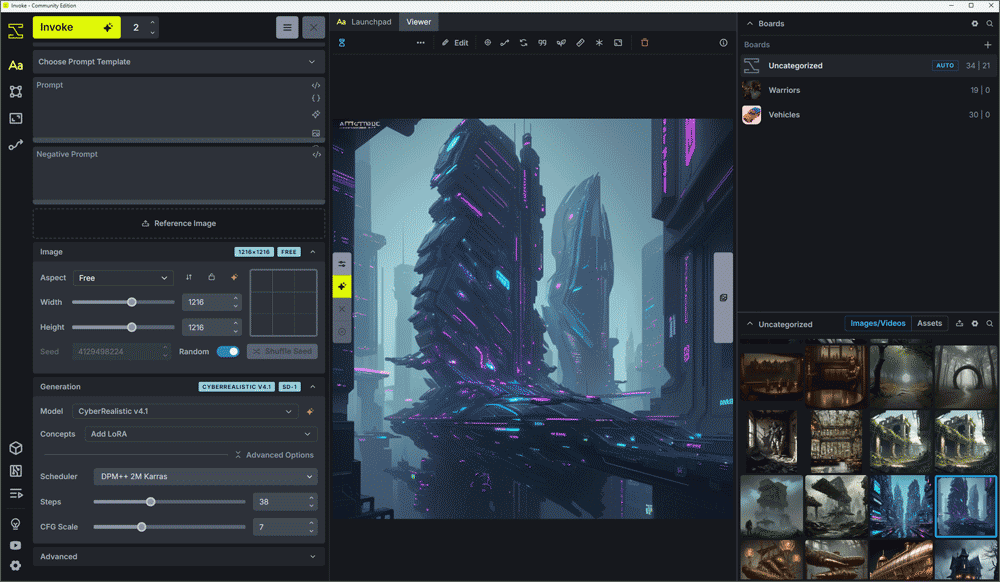
Invoke is the more conventional looking of the two applications. Its main interface places generation settings on one side, a working area in the centre and an image gallery on the other. You can enter a prompt, select a model, adjust familiar settings and generate an image without first constructing a technical workflow. Images can be organised into boards, and Invoke saves useful generation information such as the prompt, seed and selected model. Its Canvas provides layers, masks, reference images, inpainting and outpainting, making it particularly useful when you want to develop or repair an image rather than continually generate new ones from scratch. Invoke's interface guide provides an illustrated overview of these areas.
Invoke also includes a node-based Workflow Editor for more advanced work. This means it is not restricted to simple image generation: you can connect operations together, save workflows and reuse them. However, those technical details can remain largely out of sight until you need them. Invoke can even present the important settings from a complex workflow in a simpler form, allowing somebody to use the workflow without navigating a large collection of nodes.
What ComfyUI allows you to do
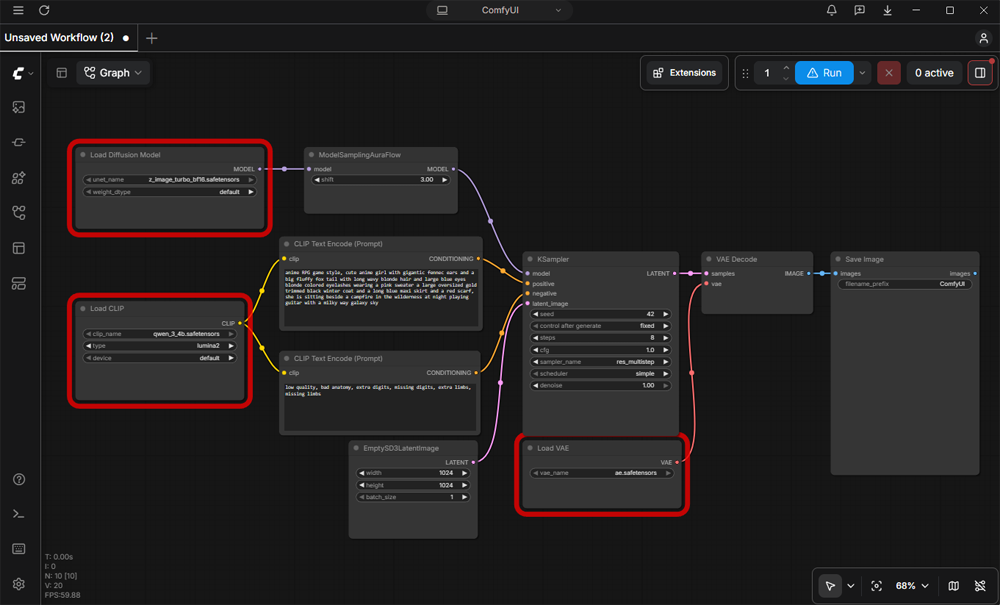
ComfyUI begins from a different philosophy. Its central feature is a large workspace containing boxes called nodes. One node may load a model, another may hold the positive prompt, another may create the starting noise, and others may control sampling, decoding, upscaling or saving. Connections between these nodes show exactly how information travels through the generation process. The result resembles a flowchart for making an image.
This approach provides exceptional flexibility. A workflow can branch into several versions, compare different samplers, process an image at multiple resolutions or combine several models and control methods. Workflows can be saved and shared, and an image generated by ComfyUI can contain enough embedded information to help reconstruct the workflow that created it. ComfyUI also has an extensive custom-node ecosystem, which often gives it early access to new models and experimental techniques. Its newer interface includes model, asset, workflow and template libraries, while App Mode can hide the underlying graph and expose a simpler set of controls to the person running it. The official interface overview includes current screenshots and explanations.
Why choose Invoke?
Invoke is generally the easier starting point for artists, photographers and other visually minded users. Its Canvas makes masking, inpainting, extending an image and working with layers feel more like using an image editor. Its gallery and boards also make it easier to organise generations without browsing through output folders manually. A beginner can obtain useful results before learning precisely what every component in the diffusion process does.
The disadvantage is that Invoke's structured interface can feel restrictive when you want to attempt an unusual or highly experimental workflow. Its Workflow Editor supplies considerable power, but ComfyUI remains the environment around which many community workflows and newly released custom tools are first developed. Instructions written specifically for ComfyUI cannot normally be imported directly into Invoke, even when both applications support the same underlying model.
Why choose ComfyUI?
ComfyUI is a strong choice when maximum flexibility, experimentation or automation matters most. It allows you to inspect and change almost every stage of the generation process. It is also useful for repeatable production: once a workflow works, you can queue many jobs through exactly the same pipeline or connect the backend to another application. Downloaded workflows and templates can save a great deal of setup time.
Its main disadvantage is the learning curve. A beginner expecting a prompt box and a Generate button may instead encounter checkpoint loaders, CLIP encoders, latent images, VAEs, samplers and schedulers. A missing model or custom node can prevent an imported workflow from running, and installing third-party nodes can introduce dependency conflicts or security risks. Custom nodes contain executable code, so they should only be installed from sources you have checked and trust. Large workflows can also become difficult to read, with connections stretching across a crowded workspace.
Summary
Invoke and ComfyUI can often produce equally good images because image quality depends primarily on the selected model, prompt and settings-not on the interface surrounding them. The real difference is how you prefer to work.
Choose Invoke if you want the friendlier introduction, an integrated gallery and a strong visual Canvas for editing, masking and refining images. Choose ComfyUI if you want to see and control the complete generation pipeline, experiment with the newest community techniques or build complex, reusable automation. There is no need to treat the choice as permanent: many users begin with Invoke, learn the basic concepts, and later add ComfyUI when they require more specialised workflows.
For us, as beginners, we'll go with Invoke. In the next lesson, you'll get to download Invoke, you'll check your own computer to see what you have to work with in terms of AI power. Later, you'll get to download some models so you can generate your first Invoke image.