Home and Learn: C# NET Course
Try ... Catch In C# .Net
<< Continues from the previous lesson
C# has some inbuilt objects you can use to deal with any potential errors in your code. You tell C# to Try some code, and if can't do anything with it you can Catch the errors. Here's the syntax:
try
{
}
catch
{
}
In the code below, we're trying to load a text file into a RichTextBox called rtb:
try
{
rtb.LoadFile("C:\\test.txt");
}
catch (System.Exception excep)
{
MessageBox.Show(excep.Message);
}
First, note the extra backslash after C:
C:\\test.txt
The extra backslash is called an escape character. You need to escape a single backslash because C# doesn't like you typing just one of them.
The code we want to execute goes between the curly brackets of try. We know that files go missing, however, and want to trap this "File not Found" error. We can do that in the catch part. Note what goes between the round brackets after catch:
System.Exception excep
Exception is the inbuilt object that handles errors, and this follows the word System (known as a namespace). After System.Exception, you type a space. After the space, you need the name of a variable (excep is just a variable name we made up and, like all variable names, you call it just about anything you like).
The code between the curly brackets of catch is this:
MessageBox.Show(excep.Message);
So we're using a message box to display the error. After the variable name (excep for us), type a dot and you'll see the IntelliSense list appear:
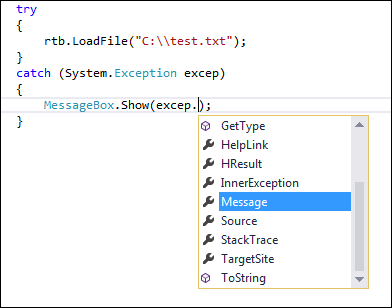
If you just want to display the inbuilt system message, select Message from the list. When the programme is run, you'll see a message box like this:

If you know the type of error that will be generated, you can use that instead:
catch (System.IO.FileNotFoundException)
{
MessageBox.Show("File not found");
}
To find out what type of error will be generated, use this:
catch (System.Exception excep)
{
MessageBox.Show( excep.GetType().ToString() );
}
The message box will tell you what system error is being generated. You can then use this between the round brackets of catch.
If you want to keep things really simple, though, you can miss out the round brackets after catch. In the code below, we're just creating our own error messages:
try
{
rtb.LoadFile("C:\\test.txt");
}
catch
{
MessageBox.Show("An error occurred");
}
You can add more catch parts, if you want:
try
{
rtb.LoadFile("C:\\test.txt");
}
catch
{
MessageBox.Show("An error occurred");
}
catch
{
MessageBox.Show("Couldn't find the file");
}
catch
{
MessageBox.Show("Or maybe it was something else!");
}
The reason you would do so, however, is if you think more than one error may be possible. What if the file could be found but it can't be loaded into a RichTextBox? In which case, have two catch blocks, one for each possibility.
There's also a Finally part you can add on the end:
try
{
rtb.LoadFile("C:\\test.txt");
}
catch (System.Exception excep)
{
MessageBox.Show(excep.Message);
}
finally
{
//CLEAN UP CODE HERE
}
You use a Finally block to clean up. (For example, you've opened up a file that needs to be closed.) A Finally block will always get executed, whereas only one catch will.
(NOTE: there is also a throw part to the catch blocks for when you want a more specific error, want to throw the error back to C#, or you just want to raise an error without using try … catch. Try not to worry about throw.)
We won't be using Try … Catch block too much throughout this book, however, because they tend to get in the way of the explanations. But you should try and use them in your code as much as possible, especially if you suspect a particular error may crash your programme.
<-- the locals window | c# methods -->
back to the c# net contents page